What Google reads in an image, then what it does with it: index, filters, ranking, AI
Google sells developers part of its image understanding: the Cloud Vision API returns, for a photo, the labels scoring above 0.5, each with its MID. Images generated by Gemini received far more: 100 per image, from most to least likely, with no threshold, until spring 2026. Conversations shared during that period still carry them in their page data. The vocabulary is that of Google’s vision models, whatever the image: run through the Vision API, the photo of a moving box gets the same /j/, Moving, as images from Gemini. In these lists, next to Knowledge Graph entities, two other prefixes keep coming back: /j/ for a dimension, an area or a scene, /a/ for a value. This layer serves commerce, and it sits far down the list.
sorted by score, with no threshold
found on 67,499 images generated by Gemini
labels; 87% have one somewhere in the 100
Our finding
Below the Knowledge Graph entities, Google records the object’s dimensions (/j/) and their values (/a/)
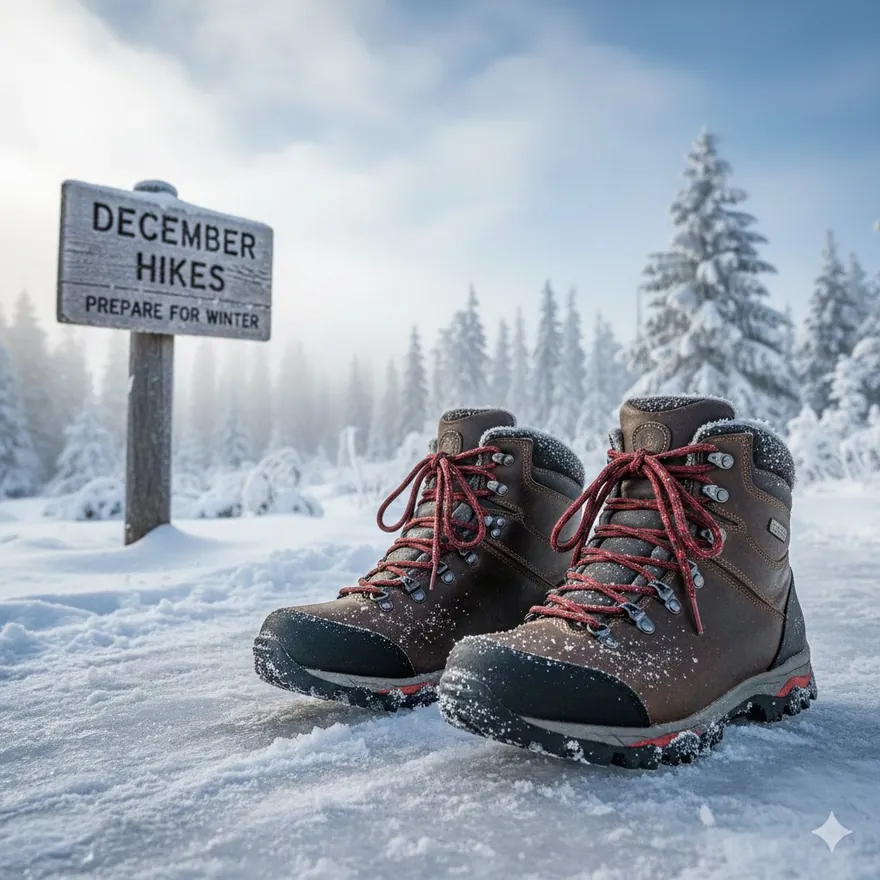
Let’s go back to the hiking boots at the top of the page. Their first ten labels are Knowledge Graph entities: Footwear, Snow, Shoe, Winter. Their MIDs start with /m/, the format of Freebase, the database Google bought in 2010 that became the foundation of the Knowledge Graph, or with /g/, the format of entities created since: these are the IDs that sit behind knowledge panels. Further down come For winter (22nd), Lace up (43rd), Shoe style (48th), then For outdoor, Round toe and Rugged. Shoe style, a /j/, names a dimension; Lace up and Round toe, both /a/, are values of it; For winter, For outdoor and Rugged, also /a/, give the use and the look.
| Prefix | What it is | What it says about the image | Examples |
|---|---|---|---|
| /m/ | Knowledge Graph entity, in the Freebase format | what the image shows | Sled dog/m/01p01nFalafel/m/015w3y |
| /g/ | More recent Knowledge Graph entity | what the image shows, in finer detail | Tonkotsu ramen/g/11bwd90s52Avocado toast/g/11g6py19lr |
| /j/ | Dimension or category: area type, scene, action, content category, product dimension | in what kind of situation, along which criterion | Table top/j/984ysmSleeve style/j/6y5h45 |
| /a/ | Value or attribute: cut, length, material, style, use | what the thing is like | Long sleeve/a/dr73ssUndermount sink/a/8y6cck |
| /t/ | ID drawn from pages, with no label: a product reference, or the theme pages give an image | which product or web topic it belongs to | iPhone 17 Pro/t/…example: label inferred from pages |
A separate vocabulary, plugged into the Knowledge Graph in places
The /j/ and /a/ look like MIDs, with a suffix always six characters long, and belong to the vocabulary of the vision models. Queried as an entity, a /j/ only returns an error, whereas an /m/ returns the entity.
This second vocabulary has its own hierarchy, its dimensions and their values, and it plugs into the Knowledge Graph in places: the barcode is an entity, its two forms are /j/.
/m/0ggbx- 1D barcode
/j/8sk4f30.97 - 2D barcode
/j/863wbw0.99
The barcode is a Knowledge Graph entity (/m/0ggbx). Its two forms are /j/: 1D barcode, the linear barcode, scored 0.97 on the back of a pouch; 2D barcode, the QR code, 0.99. The entity names the object, the /j/ the area Google Lens crops from the photo.
/j/5qg9b8- Bagged packaged goods
/j/5wqldn0.72 - Boxed packaged goods
/j/d0mdr60.70 - Bottled and jarred packaged goods
/j/5pzgsf0.53 - Canned packaged goods
/j/1dkfcf0.75 - Tubed packaged goods
/j/1971bm0.93
Packaged goods sits above five packaging types: bag, box, bottle or jar, can, tube. On photos of isolated products, the Vision API finds all five, with scores from 0.53 to 0.93. In Google Lens’s table, these six classes are neutral; Lens Lite, which keeps only 68 objects for product search, retains all six: it also targets packaged grocery products (our study of the objects Lens deems shoppable).
/j/6y5h45- Short sleeve
/a/5m67kz - Long sleeve
/a/dr73ss - Half sleeve
/a/4x501n - Full sleeve
/a/g8fdrh
Sleeve style is a dimension; its values are /a/: short, long, half and full sleeve. These are the values of Google Shopping’s “Sleeve Style” filter: the next section puts them side by side.
A scene comes out with a high score, and Google files it as backdrop
The Vision API gives two numbers per label: the score, the confidence that the thing is in the image, and the topicality, the weight of the label in the image’s subject. It puts entities and /j/ labels in a single list, sorted by score. Take the photo of an open moving box: Package delivery (/m/, 0.83), then Moving (/j/, 0.63), then Relocation (/m/, 0.58). The move appears twice, once in each vocabulary.
- 11Package delivery
/m/01d7430.83topicality 0.19 - 14Moving
/j/20b_h80.63topicality 0.015 - 17Relocation
/m/043rxy00.58topicality 0.42
Cloud Vision API, photo of an open box: rank in the label list, score, topicality.
Moving has the better score of the two, Relocation a topicality 29 times higher. The pattern holds for the 9 /j/ that came out as labels of the 34 photos we ran through the API: a /j/ comes out with a score as high as an entity’s (median 0.76 against 0.77) and a topicality eight times lower. Most labels have a topicality close to zero; only the image’s subject ranks high. On a beach photo, Beach (/m/) comes out with a score of 0.98 and a topicality of 0.53; People on beach (/j/), at 0.84, has a topicality of only 0.0009. Google is confident about the scene, and knows it is only the backdrop.
The /j/ also describe the staging: a table set for dinner becomes Wedding banquet, pets on the grass Pet an animal, a box Moving. They name area types (Table top, Storefront, packaging, barcodes) and sensitive content categories (Firearms, Nudity), qualified by context: fiction, cartoon, advertising, news. The /a/ also qualify style and use: Vintage, Luxury, For prom, For winter. For a product photo, the setting adds an occasion of use, with a low topicality: Google keeps it as context for the subject.
The fifth prefix, /t/, comes from the pages an image appears on and from search. On merchant pages, a /t/ identifies a specific reference, with its barcode, the same at every merchant that sells it. In web detection, the part of the Vision API that reads the pages an image appears on, it identifies a product family or a theme. It always comes without a label.
The values read on the photo are those of Google Shopping filters
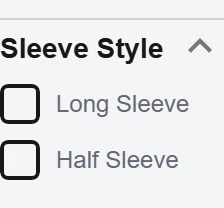
Take two queries on Google Shopping US: “dresses” and “bathroom sinks”. In the filter column, dresses can be filtered by “Sleeve Style” (Long Sleeve, Half Sleeve), “Silhouette”, “Formal Occasion”; sinks by “Installation” (Undermount, Self-rimming, Wall-mount) and “Style” (Vessel, Pedestal, Console). The values of these filters reappear in the /a/ Google puts on photos (Long sleeve, Undermount sink, For prom), and “Sleeve Style” is also a /j/. The /j/ plays the part of the filter, the /a/ that of the checked box.
On the left, Google Shopping filters (United States); on the right, the matching labels Google attaches to photos
Query “dresses”

 Sleeve style
/j/6y5h45Long sleeve/a/dr73ssHalf sleeve/a/4x501n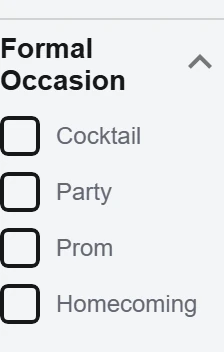 For prom
/a/bckrxlFor homecoming/a/g6jk9w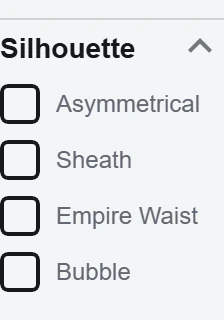 Asymmetrical
/a/42lnhn
Query “bathroom sinks”

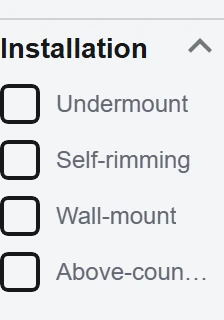 Sink type
/j/4fs9rdUndermount sink/a/8y6cckSelf rimming sink/a/8dv91hWall mount/a/g6jfls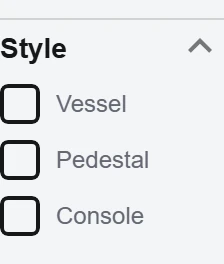 Vessel sink
/a/znv7b6
The categories where Google reads product features off the photo
Some product categories get far more values than others. On images generated by Gemini, the Clothing length dimension comes with a length in 90% of cases, Sleeve style with a sleeve value in 80%, Shoe style with a shoe detail in 72%. Furniture style, found on more than a thousand images, has a value in less than 1% of cases. These gaps show which products Google treats as having features visible on the photo: clothes, shoes and sinks, far more than furniture and curtains.
When Google sees the dimension, does it also give a value?
- Clothing length90% 134 of 149
- Sleeve style80% 153 of 192
- Shoe style72% 43 of 60
- Sink type56% 15 of 27
- Collar style54% 21 of 39
- Eyeglass style33% 70 of 215
- Curtain style2% 1 of 64
- Furniture style1% 9 of 1006
Show on the photo what the filter asks for
For Google to read a dress’s length, show it full length; for a sleeve’s shape, a whole sleeve; for a sink’s mounting, the rim of the basin and the countertop. The product feed and the photo then give the same values, and each confirms the other. Our Google Shopping, from the SERP to AI Mode infographic details the catalog’s 82 filters and the scores behind them.
Fifteen images and their 100 labels: what the 0.5 threshold leaves out
Until spring 2026, every image generated by Gemini came with 100 labels. These labels are no longer visible. Conversations shared at that time keep them: the 67,499 images we studied come from the public conversations of our Gemini study. Here are fifteen public conversations, each with a link: pick an image, filter the labels by vocabulary, set the threshold to 0.5 to see what the Vision API would keep.
DIYRead the labels of a shared conversation yourself
The fifteen conversations, at gemini.google.com/share/
- Hiking boots
46d214584453 - Embroidered handbag
0b6ea7e2534c - Detergent box
be06d48c419f - Bathroom
b4066d6a83f8 - Bowl of ramen
985bca1fe462 - Salmon and vegetables
8bfd3423058e - Garlic and chili spaghetti
e1550278030b - Breakfast
b5dccea15173 - Ballroom after the party
bfbe1a0f7536 - City of the future
faf66e48a022 - Mount Fuji and maple
54dd5701b049 - Cats and dog
4dc927bbb7d9 - Crayon tree
28fa8388d3d3 - Vintage handbrake
5d628c9eb35c - T-shaped line
091288b1b7e3
Start with the Detergent box: four /j/ IDs, including Packaged goods. On Mount Fuji and maple and Vintage handbrake, search for “/a/”. Both methods work on any shared conversation whose images Gemini generated before spring 2026.
No code: the Network tab
Open a conversation in Chrome, then DevTools (F12), Network tab. Type “ujx1Bf”, the call that loads the conversation, in the filter box and reload the page: one line remains. Click it, open the Response tab and search for “/j/” with Ctrl+F. Each label reads [\"Table top\",\"/j/984ysm\",0.6248081]: name, MID, score.
One paste: the console
On the conversation page, open the DevTools Console tab and paste this code (the first time, Chrome asks you to type “allow pasting”). It reruns the ujx1Bf call and prints one line per label, from most to least likely, as ["Table top","/j/984ysm",0.6248081].
fetch('/_/BardChatUi/data/batchexecute?rpcids=ujx1Bf', {
  method: 'POST',
  headers: {'Content-Type': 'application/x-www-form-urlencoded;charset=UTF-8',
            'X-Same-Domain': '1'},
  body: 'f.req=' + encodeURIComponent(JSON.stringify([[['ujx1Bf',
    JSON.stringify([null, location.pathname.split('/').pop(), [4]]), null, 'generic']]]))
}).then(r => r.text()).then(t => console.log([...new Set(
t.replaceAll('\\"', '"').match(/\["[^"]+","\/[a-z]\/\w+",[\d.]+\]/g))].join('\n')))The Google Vision demo shows the /j/ IDs in its raw response
The Vision API, the image analysis service Google sells to developers, uses the same /j/ IDs as Gemini’s images: Table top, Bagged packaged goods, Playing in the snow. Each of these twelve freely licensed Wikimedia Commons photos gets at least one (in orange), on a detected area of the photo or on the whole image.
DIYRun the test in four steps
- Download one of the photos above (“Download the tested photo” link) or use your own: JPEG, PNG, GIF or BMP, under 4 MB.
- Open the Google Vision demo, scroll down to the “Try the API” box and drop the file in.
- Tick “I’m not a robot”. The Objects and Labels tabs match the viewer’s two columns, with names and scores; the IDs are in the JSON.
- Click “Show JSON” and search for “/j/”: for the pouch,
"mid": "/j/8sk4f3"sits next to"name": "1D barcode".
From Googlebot-Image to the index: Google captions every image and ties it to a few pages
Googlebot-Image fetches the image, Amarna, Google Search’s image system, gathers everything the models see in it, then Google ties it to a few pages and sorts it into the flags that Google Images filters read. Compared with the 2024 leak, the Google code we had access to adds everything related to AI and safety to what the index keeps about an image: a caption written by Google, its entities, C2PA provenance (the “Content Credentials” that certify an image’s origin), the Google-Extended opt-out (the robots.txt user agent token that keeps content out of Gemini training and grounding), a child safety check. It also adds the frame of the main subject and the source image among the copies.
- 1
Googlebot-Image fetches every image
“All images are crawled using googlebot-images”, the leak says. Crawl status is tracked per cluster of copies, with the reason for any failure. robots.txt rules aimed at Googlebot-Image apply to Google Images, Discover and every Google Search feature that shows images.
ImageData.robotedAgentscrawlers blocked by robots.txtImageMoosedogCrawlStatecrawl status, per cluster of copies - 2
Amarna gathers everything the models see in the image
Amarna, the system that stores and analyzes Google Search’s images and videos, keeps for each image its labels, faces and products, the text read in it by three OCR engines side by side, its quality and SafeSearch scores, its embedding, its near-duplicate fingerprint and its likelihood of being generated. Text read on a package also links the photo to the right Shopping product listing.
OcrSummarytext read in the imageIm2ShopOCRFeaturepackage text linked to Shopping - 3
Google writes a caption and lists the entities
Every indexed image gets a caption written by a model, with the probability the model gives it, and the list of Knowledge Graph entities recognized, each with its score. The main subject is framed, with a separate bounding box for the face and its own entities. Each label carries two topicality measures and a score of how much it tells about the image; some labels are inherited from visually similar images.
packed_multiref_captioncaption written by Googlepacked_multiref_entitiesrecognized entitiescutoutframe of the main subjectinformativeness_scorehow much the label tells about the image - 4
Copies are grouped, ranked and dated
All copies of an image form a ranked group, where rank 1 is the best. Google keeps, for the whole group, the first crawl date and the source image’s address: publishing the original on your site first makes you that source. A stock photo reused by a hundred sites competes for a single spot.
rankInNeardupClusterrank in the cluster of copiescontentFirstCrawlTimefirst crawl of the contentimage_neardup_sourcesource image among the copies - 5
A fixed number of pages carry the image; the others are “rejected”
For each image, Google keeps a fixed number of referring pages; on the other pages that show it, the image is said to be “rejected”. It records whether the image is displayed on the page or only linked, keeps the surrounding text, used to scroll visitors straight to the image when they arrive from Google Images, and recognizes a companion image domain, a CDN or a subdomain, when the link holds over time.
referrerDocidreferring pageisVisibledisplayed or only linkednearbyTextnearby textcodomainStrengthtie to a companion image domain - 6
The Google-Extended opt-out follows the image
Google-Extended is the robots.txt user agent token that controls whether content is used to train Gemini models and for grounding. For each image, Google keeps that opt-out and what decided it: the robots.txt, or the page that displays the image. It adds a compliance status for the common corpus where Google gathers the content its AI models may use, checked against those same pages. Indexing in Google Images is still governed by Googlebot-Image.
robots_policy_signalGoogle-Extended opt-outeffective_google_extended_sourcewhat decided: page or robots.txtgcc_image_url_policy_signalscommon corpus compliance - 7
Mustang sorts the image into the filters
Mustang, the system that serves Google Search’s index, keeps with the image its faces and crops, ready to serve, and the “restricts”: the 86 flags that Google Images filters read.
PrecomputedRestrictsthe filter flags
An image ranks on what it shows, where it sits on the page and the clicks it gets
Take the query “scandinavian chair”. For Google Images, the query is also a vector: it goes through Starburst’s text encoder, Google’s image embedding model, which places it in the same space as images, then gets compared directly with their vectors. A chair that does not look Scandinavian sits further from the query in that space, even with alt text that says otherwise. Visual content, image quality, its place on the page and clicks each feed into the ranking.
Query and image meet in the same vector space
One Starburst version is built on Gemini Embedding 2, the multimodal embedding model Google opened to developers in March 2026 (Gemini API, Vertex AI): measuring with it how close a query sits to your images gives an idea of what Google Images sees. Separate models retrieve and then score images, for a written query and for a query that mixes a photo and text (multisearch); one query encoder is dedicated to food and drink queries. The 2024 leak shows another measure, probably the older mechanism, or one being replaced: the pamir algorithm (PAMIR, Passive-Aggressive Model for Image Retrieval) scores the image content for each query and turns it into a multiplier. It builds on a model published in 2008 by David Grangier and Samy Bengio, which ranks images for a text query from their colors and edges.
In Google’s code
StarburstVersion.GEMINI_EMBEDDING_V2_SEARCHthe Starburst version built on Gemini Embedding 2STARBURST_TEXT_V5_PLCthe text encoder, which encodes the queryIMAGEEMBED_MM_QUERY_RETRIEVAL_V1006retrieval for an image + text queryMCC_FOOD_AND_DRINK_QUERY_TOWERthe encoder for food and drink queriesimageContentQueryBoostpamir’s per-query multiplier (leak)
Scored at indexing, image quality also lifts the page in web results
At indexing, every image gets two NIMA scores (Neural Image Assessment, a model published by Google Research): one aesthetic, one technical.
In web search too, a page’s images arrive with their salience, meaning their importance on the page, their estimated relevance, from 0 (off-topic) to 1 (very useful), and three scores: technical quality, emotional quality and ability to hold attention (DImE, Deep Image Engagingness). A web search twiddler, a function that reorders results after ranking, reads them to lift the page that shows them.
In the 2024 leak
nimaAva · nimaVqNIMA aesthetic and technical scoressalience · estRelevanceplace on the page, estimated relevancetqStar · eqStar · dimeScoretechnical quality, emotional quality, engagement
NavBoost also ranks images by clicks and flags click magnets
NavBoost, Google Search’s click memory, also exists for images: for a query, it gives the image’s rank based on clicks and the rank of the page that displays it. Hovers and clicks relative to impressions measure how appealing the thumbnail is. A “click magnet” score spots the image that draws clicks from unrelated queries: the off-topic click counts against it.
In the 2024 leak
ImageExactBoostNavQuery.imageClickRankthe image’s click-based rank for the queryimageQualityClickSignalsclicks and hovers relative to impressionsclickMagnetScorethe click-magnet score for unrelated queries
Orbit classifies every image: person, animal, meme, hateful symbol, faces
Orbit, the Google Search classifier that sorts pages by intent (our search intent infographic), also classifies each image on its own: a person, an animal, a meme, a hateful symbol, visible faces. The page that publishes the image is an optional input. A class applies from indexing onward, or only when Google assembles the results page. It can trigger a treatment or remove the image from a result: a meme or a hateful symbol is spotted before any query.
In Google’s code
ImageIntent.Intentperson, animal, meme, hateful symbol, visible facesOrbitImageIntent.InputTypethe image alone, or the image and its pageOrbitImageIntent.Reachat indexing, or when results are assembledOrbitImageIntent.trigger · removethe class triggers a treatment, or removes the image
For images, Google filters out first, then ranks
RankLab, the platform where Google records its ranking signals for each query and each result, keeps image-specific signals: how the image was retrieved (text index, embedding, visual neighbors), what users do after the search, the intent clusters of the image pack, the suggestions inserted in the grid. An image result’s data keeps “filter” scores apart: Google first filters images out, then ranks the ones left.
A place’s photo is picked large, landscape and true to the name
To pick the photo that stands for a place, Google scores each candidate: visual quality, photo rather than drawing, size, landscape format, duplicates, match with the place name and with the searched entity, recognized labels, the photographer’s reputation. A manual rank can settle it. A large, landscape photo, distinct from the others and true to the name, has the edge.
The 19 criteria, in Google’s code
ARGYLE_VISUAL_QUALITY_SCOREvisual quality (Argyle model)IS_PHOTO_SCOREphoto rather than drawingVALID_PHOTO_SCOREvalid photoIMAGE_SIZE_SCOREsizeLANDSCAPE_PREFERRED_SCORElandscape preferredNEAR_DUPLICATE_PHOTO_SCOREnear duplicateNAME_MATCH_CONTENT_SCOREmatch with the place namePAMIR_NAME_MATCH_CONTENT_SCOREvisual match with the name (pamir)QUERY_TO_ENTITY_SCOREmatch with the searched entityQUERY_TO_KFT_SCOREmatch with the query, measured by another model (KFT)ICA_LABEL_SCORElabels from image content annotation (ICA)ICA_CONTENT_SCOREcontent recognized by image content annotation (ICA)WEB_REF_CONTENT_SCOREentities from pages (Webref)PHILEAS_CONTENT_SCOREcontent judged by another recognition system (Phileas)SALT_MATCH_SCOREmatch according to another recognition system (SALT)VDICT_SCOREvisual dictionary score (VDICT could stand for visual dictionary)CONFUSION_SCOREconfusion riskTOP_PHOTOGRAPHER_SCOREtop photographersMANUAL_RANKmanual rank
Google Images filters read 86 flags set at indexing time
Before a search comes in, Google has already sorted every image into flags: color, type, faces, aspect ratio, size, format, license, SafeSearch. The 2024 leak names these “restricts”, computed before the serving index is built; the Google code we obtained lists them: 86 flags. A filter judges the file itself: its actual dimensions, format, colors and declared license.
Colors 15
The twelve swatches of the Color filter, black and white, full color.
COLOR_BLACKblackCOLOR_BLUEblueCOLOR_BROWNbrownCOLOR_GRAYgrayCOLOR_GREENgreenCOLOR_ORANGEorangeCOLOR_PINKpinkCOLOR_PURPLEpurpleCOLOR_REDredCOLOR_TEALtealCOLOR_WHITEwhiteCOLOR_YELLOWyellowMONOblack and whiteCOLORfull colorTOLERANT_GRAYgray, with tolerance
Image type 9
Photo, drawing, animation, and the stock photo, flagged as such.
PHOTOphotoCLIPARTclip artLINEARTline drawingANIMATEDanimated (GIF)TRANSPARENTtransparent backgroundCLIPART_HRclip art, HR variantPANORAMICpanoramaPORTRAITportraitSTOCKstock photo
Faces 6
The number of faces and apparent gender, computed in advance. The UI offers a single “Face” type, with neither count nor gender.
FACES_ONEone faceFACES_TWOtwo facesFACES_SEVERALseveral facesFACES_MANYmany facesFACE_MALEmale faceFACE_FEMALEfemale face
Aspect ratio 9
Nine aspect ratios; the UI groups five of them under four choices.
_image_aspect_talltall_image_aspect_xtallextra tall_image_aspect_squaresquare_image_aspect_widewide_image_aspect_xwidepanoramic_image_aspect_16x1016:10_image_aspect_16x916:9_image_aspect_4x34:3_image_aspect_nearsquarenear square
Size 28
Seventeen “larger than” thresholds, up to 140 megapixels, and size classes.
_image_size_atleast_400x300≥ 400×300_image_size_atleast_640x480≥ 640×480_image_size_atleast_800x600≥ 800×600_image_size_atleast_1024x768≥ 1024×768_image_size_atleast_1280x800≥ 1280×800_image_size_atleast_1440x900≥ 1440×900_image_size_atleast_2MP≥ 2 MP_image_size_atleast_4MP≥ 4 MP_image_size_atleast_6MP≥ 6 MP_image_size_atleast_8MP≥ 8 MP_image_size_atleast_10MP≥ 10 MP_image_size_atleast_12MP≥ 12 MP_image_size_atleast_15MP≥ 15 MP_image_size_atleast_20MP≥ 20 MP_image_size_atleast_40MP≥ 40 MP_image_size_atleast_70MP≥ 70 MP_image_size_atleast_140MP≥ 140 MPICONiconMEDIUMmediumLARGElargeSMALLsmallXLARGEextra largeXXLARGEXXL_imagehugehugeBEST“best”_image_size_iconicon_image_size_smallsmall_image_size_mediummedium
File type 9
Nine formats; HEIF, the container AVIF uses, is kept out of the UI.
FILETYPE_JPGJPGFILETYPE_GIFGIFFILETYPE_PNGPNGFILETYPE_BMPBMPFILETYPE_SVGSVGFILETYPE_WEBPWebPFILETYPE_ICOICOFILETYPE_CRAWcamera RAWFILETYPE_HEIFHEIF
Usage rights 2
The “Usage rights” filter, read from the declared license.
CC_LICENSECreative Commons licensesNON_CC_LICENSEcommercial and other licenses
SafeSearch 5
An “adult content” flag and its three filtering levels, a violence flag: they serve the account’s SafeSearch setting.
_img_porn_moderateadult, moderate filtering_img_porn_strictadult, strict filtering_img_porn_very_strictadult, very strictPORNadult contentVIOLENCEviolence
Other 3
Visual neighbors, and the image kept out of the image pack in web results.
HAS_SIMILARhas similar imagesNOT_UNIVERSALkept out of the image pack in web resultsALLall images
Faces, apparent gender, stock photo: Google computes them for every image
Google counts the faces in every image, records their apparent gender and flags stock photos; Google Images itself offers a single “Face” type. Advanced image search offers fourteen size thresholds, up to 70 megapixels, four aspect ratios and eight file types; the code provides seventeen thresholds up to 140 megapixels, nine aspect ratios (16:9, 4:3, near square…) and a HEIF flag, the container AVIF uses; Search Central lists AVIF among indexed formats. All these flags are set before any search, whether or not a public filter reads them.
The Color filter separates the object from the background, skin and faces
For the Color filter, Google tells the foreground color from the background color and weighs the border, skin and faces separately: a red sweater worn by a model stays a red sweater. The code’s twelve colors are exactly the filter’s twelve swatches.
SafeSearch: an image takes on the rating of the pages that show it, a site that of its images. The leak describes an image’s score as the combination of its pixels, the queries its clicks come from and the pages that display it, near-duplicates included: a swimsuit photo reused by adult sites gets classified as adult along with them. A site also has its own rates: its share of adult content, and the average violence of its images and videos.
AI Mode draws its images from Google Images, and spots the answers that lack them
When given a photo, AI Mode relies on Google Lens, Google’s visual search, to identify each object, then runs queries on the whole image and on each of its objects: query fan-out applied to images, the “visual search fan-out”, which breaks a single photo into dozens of sub-queries. Here we explain how AI Mode searches for and scores the images in its answers.
In AI Mode, images are scored like results
Mars, the server that produces Google’s AI search answers (AI Mode, Ask Maps…), has its own image search pipeline, with ranking signals for each result. The images in an answer are Google Images documents: when a user reports an image as wrong, off-topic, copyrighted or low quality, the report points to the indexed image. Four of the criteria used to evaluate generated answers concern images: did the question call for images, did the answer lack them, did it show images when it should not have, is the image shown a bad one.
In Google’s code
MarsImageSearchRanklabResultSignalsthe ranking signals Mars logs in RankLab, the platform that records each result’s signalsMagiFeedbackContext.image_doc_idsimages reported in magi answers (magi: Google’s code name for AI in search results, AI Overviews and AI Mode), by their Google Images IDVISUAL_SEEKING · LACK_OF_VISUALS · VISUAL_WRONG_TRIGGERING · BAD_VISUALquestion that calls for images, answer that lacks them, images shown when they should not be, bad image
In Lens, a photo of a screen is told apart from the object
Lens, which handles more than 25 billion visual searches a month, knows whether it is shown an object, a photo of a screen or a screenshot, and picks its result formats accordingly: products, visual matches, exact matches, homework, videos, “About this image”. For each detected object, Google chooses to draw nothing, the bounding box, or the bounding box and its name: that is the mechanism behind “search inside the image”. Our two studies detail what Google Lens sees and the objects it deems shoppable.
In Google’s code
MEDIUM_PHOTO_OF_SCREEN · MEDIUM_PHYSICAL · MEDIUM_SCREENSHOTphoto of a screen, physical object, screenshotRESULT_FORMAT_ID_VISUAL_EXACT_MATCHESexact matches, which lead to the pages where the same image appearsImageRegion.RenderTypenothing, the bounding box, or the bounding box and its name
Generated or not: Google combines watermark, fingerprint and metadata, and knows when to abstain
“About this image” tells whether an image was created or edited with AI, based on SynthID, the invisible watermark Google DeepMind embeds in the pixels at creation time, and on C2PA metadata (Coalition for Content Provenance and Authenticity), the “Content Credentials” standard. More than 20 billion pieces of content carry the SynthID watermark (November 2025).
Without a clear clue, Google declines to say whether an image is generated
Detection combines four clues: the SynthID watermark, a fingerprint search among the images Google’s models have generated, C2PA and IPTC metadata (IPTC: the International Press Telecommunications Council’s photo metadata standard, born in news agencies), and a visible “AI” label on the image, which a detector spots. The verdict has five values: accept (the image is judged generated), fallback accept, abstain, reject, fallback reject. SynthID abstains when the file is empty, too small, low quality or possibly tampered with. The overall verdict becomes more demanding for a low-resolution image or one far from the images the model knows: a clearer clue is then needed to conclude.
In Google’s code
GeneratedImageLikelihoodQueryResult.Decisionaccept (the image is judged generated), fallback accept, abstain, reject, fallback rejectGeneratedImageLikelihoodQueryResult.DecisionVersiona more demanding verdict for a low-resolution image or one far from the images the model knowsFingerprintSearchResult.Decisiongenerated by Google, or notSynthIDResponse.AbstentionReasonempty file, low resolution, low quality, possible tamperingSynthIDResponse.ImagePrevalencehow widely the image circulates
The index keeps each signed image’s source type and every edit
In the index, the image keeps its C2PA check: the signer, its assurance level, the image’s source type (real-life capture, created by AI, composition…) and each of its edits. Crop, color, removing an element, stylizing: each edit comes in three versions, done with a generative AI tool, without one, or with a tool “possibly” powered by AI. A product photo whose background was removed or an element erased with an AI tool keeps that trace in the index, and “About this image” relies on it to say the image was edited with AI.
Real-life capture
- real-life capture
REAL_LIFE_CAPTURE - stitched capture
REAL_LIFE_STITCHED_CAPTURE - enhanced without generative AI
REAL_LIFE_CAPTURE_WITH_IN_LINE_NON_GENAI_ENHANCEMENTS
Created by AI
- partly generated
PARTLY_GENAI_CREATION - fully generated
FULLY_GENAI_CREATION
May contain AI
- composition
COMPOSITION_WHICH_MAY_CONTAIN_GENAI_CONTENT - digital art
DIGITAL_ART_WHICH_MAY_CONTAIN_GENAI_CONTENT - screen capture
SCREEN_CAPTURE_WHICH_MAY_CONTAIN_GENAI_CONTENT
Other
- digital creation without AI
NON_GENAI_DIGITAL_CREATION - unknown provenance
MEDIA_OF_UNKNOWN_PROVENANCE - blank file
BLANK_FILE
In IPTC data, Google reads AI origin and license. The Digital Source Type field declares an image as generated (trainedAlgorithmicMedia), composite or edited by AI. Google also reads the license type (Creative Commons, rights managed, royalty free, editorial only, microstock), which feeds the “Usage rights” filter, and model and property releases. Google’s documentation states that when IPTC and structured data disagree, structured data wins.
For SEO: show the subject, publish the original, serve the full-size file, metadata included
Work on an image like a page: what it shows, the file that carries it, the page that displays it and the clicks it gets each count at their own stage.
Show what the query and the filters ask for
Google compares the query with the visual content, through Starburst, its image embedding model, and pamir, its per-query visual score; with Gemini Embedding 2, open to developers, you can measure that closeness between your queries and your images. A sharp packshot, whole product on a neutral or transparent background, returns its packaging type; a shelf returns none. Show in full what the filter asks for: a dress’s length, the sleeve, the rim of a sink. A lifestyle shot adds the occasion (wedding, moving, beach) without taking over the subject: Google keeps it as setting.
Publish the original on your own site, first
Google keeps, for the whole group of copies of an image, the first crawl date and the source image’s address: publishing the original on your site first makes you that source. Google also flags stock photos as such, and a hundred sites publishing the same photo compete for a single spot. A merchant who sends product listings to resellers through XML feeds, or a publisher who syndicates content, should leave a few minutes between going live on its own site and sending the content out: Google then finds the images on its site first.
Display the image on the page, large, near the text about it
Google indexes images in
<img>elements and records whether the image is displayed on the page or only linked. Salience and estimated relevance follow the image all the way to web ranking. Search Central advises placing the image near the text about it; Google keeps that text with the image.Make the alt text, the on-page caption and the image say the same thing
Google writes its own caption for every image and attaches the entities it recognizes; it cross-checks the alt text, computer vision and the page text. An alt text that describes what the image shows reinforces that reading.
Serve a file that fits the filters
Filters read the file: its real dimensions, aspect ratio, format, transparency and license. Serve the original at full size and declare its license in structured data or IPTC for the “Usage rights” filter and the “Licensable” badge.
A thumbnail that appeals without clickbait
NavBoost, Google Search’s click memory, measures how appealing the thumbnail is, query by query: hovers and clicks relative to impressions. An image that draws clicks from unrelated queries gets flagged as a “click magnet”. A visual that reads well at small size and stays true to the query wins on both counts.
Keep provenance data, set Google-Extended on the image host
Provenance checks read the file: a CDN that strips metadata erases C2PA and IPTC, the data that says where the image comes from; an image shrunk too far makes SynthID, Google’s watermark, abstain. For each image, Google keeps the Google-Extended opt-out, the robots.txt user agent token for Gemini training and grounding, with its source: the robots.txt, or the page that displays the image. A robots.txt covers a single host: for a CDN or an image subdomain to follow the site’s rule, set it in their robots.txt too.
Restaurants and hotels: name the dishes, get the place photo right
A complete menu in Google Business Profile gives customers’ photos their names, and dish names entered by the business take precedence over those added by customers. For a place photo, Google prefers a large, landscape image, distinct from the others and true to the name.