Tests · October 2026

Chrome is preparing an API that turns what your visitors type into filters: 38% to 85% right depending on the engine

A visitor types “cheap electric city car” into a car site’s search box. With the Decisions API, which Google is building for Chrome, the site will be able to ask the browser to tick the right filters, without going through a server. We tested it with the three AI models that can power it, then compared Chrome’s current model with its version 2, released on October 6.

37.9%correct answers with EmbeddingGemma
63.8%correct answers with Laya
85.2%correct answers with Gemma 4

Powered by RESONEO

Google is building two AI tools into Chrome that websites will be able to call. The embedding API sums up the meaning of a text as a “meaning signature”, a list of numbers used for instance to sort pages by topic. The Decisions API answers closed questions (yes or no, a pick from a list, a rating) about what the visitor types on the site. Both compute on the visitor’s own computer, and neither is switched on yet. On October 6, Google released EmbeddingGemma 2, the new version of Chrome’s model, and added the Decisions API to Chrome’s code. We tested the Decisions API on 414 queries and compared the two model versions on 151 pages.

Table of contents

1

Google wants Chrome to understand text without going through its servers, but nothing is switched on yet

The three reasons Google gives (Decisions API proposal, Chrome Status page for the embedding API, EmbeddingGemma 2 announcement), our reading, then where Chrome really stands on October 7, 2026.

1

Cheaper and more private than an online AI

The computation runs on the visitor’s own computer: no server to pay for, no personal data sent. When a visitor types “cheap women’s waterproof jacket” into a fashion site’s search box, the site can map the request to the right departments without paying an online AI. And every site shares the same model.

2

Turning a sentence into filters or actions

Google is targeting sites that need to decide quickly from a sentence. On a hotel site, which filters to tick for “dog-friendly, not too expensive”? In an online storage service, which button to press when someone types “share this file with my coworkers”?

3

Models that pick instead of write, in the wake of Jev

According to Google, having a large model write an answer to choose between three options is “10 to 50 times” heavier. Google takes up the idea of Jev, launched on September 15 by the start-up TypeSafe AI: a model that does not write, but picks from answers set in advance. It cites Jev on its Chrome Status page and published its proposal two weeks later. Chrome does not run Jev, though: its engines are EmbeddingGemma, Laya (an open source equivalent of Jev) and Gemma 4, a large model that is more accurate but slower.

4

Our reading: after Topics, Google lets sites build their own categories

Google first wanted to classify users for advertising (Topics), then pages with the IAB advertising taxonomy (Classifier API), and dropped both. It now gives publishers the tool to create their own sections, such as “mountain trail running” or “first marathon”, and sort their pages into them. Neither the Decisions API proposal nor the Chrome Status page for the embedding API mentions advertising.

From Topics to the Decisions API: the timeline since October 2025

Oct 2025
Privacy Sandbox shut down (Topics and the rest)
Third-party cookies stay; the “cookieless” plan ends
May 18, 2026
Classifier API dropped, for “lack of interest signals”
The imposed ad taxonomy did not catch on
May 26, 2026
Embedding API prototype announced
The Classifier API’s replacement
Aug 2026
The embedding API shows up in Chrome Canary, Chrome’s test build
Sites can get a text’s meaning signature
Sep 15, 2026
Start-up TypeSafe AI launches Jev, a model that picks instead of writing
Open source equivalents, Laya among them, follow within a week
Oct 1, 2026
Google publishes the Decisions API proposal
It cites Jev as an example
Oct 5, 2026
Chrome lists three Laya models
A dedicated decision engine is coming
Oct 6, 2026
EmbeddingGemma 2 released; the Decisions API lands in Chrome’s code, with no engine
Model and use case arrive together

Where Chrome really stands on October 7, 2026: nothing is switched on for users

Everything is being prepared in Chrome’s test builds. As a reminder, a “meaning signature” is a list of 768 numbers that sums up a text; “women’s waterproof jacket” and “ladies’ rain coat” get close signatures without sharing a word.

ItemWhat it isIn Chrome on October 7
EmbeddingGemma 2Open model that turns text, images, audio or video into a meaning signature; 100 languagesAbsent: Chrome still ships EmbeddingGemma 1 (May 2026)
Embedding APIComputes a text’s meaning signature for the sitePresent but switched off, even in consumer Chrome
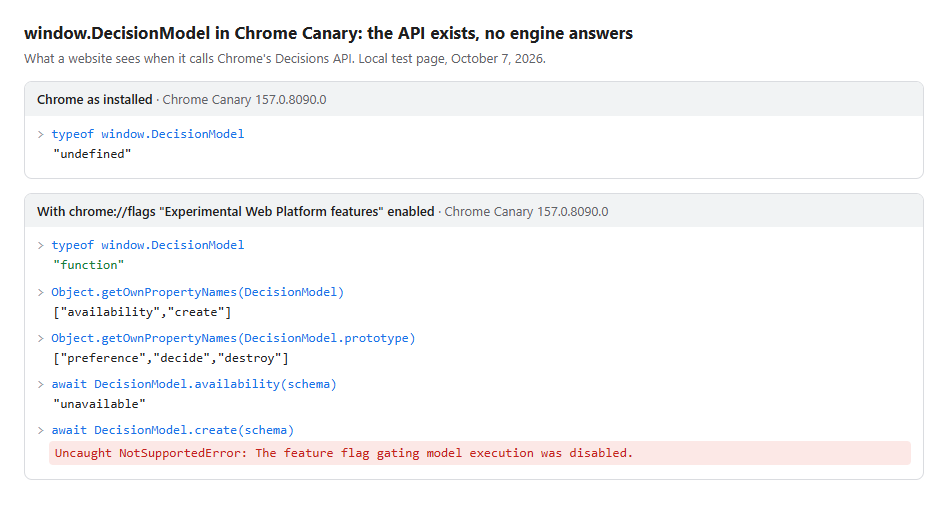
Decisions APIAnswers a site’s closed questions about what the visitor typesLanded in Chrome Canary on October 7, behind an advanced setting. With no engine, it answers “unavailable”
LayaOpen source equivalent of Jev, built outside GoogleListed since October 5, but Chrome cannot run it yet
Gemma 4Large model that writes, already used by other Chrome AI toolsIts connection to the Decisions API is under review at Google
Chrome Canary console: the Decisions API (DecisionModel) exists with the experimental setting, but answers “unavailable” and refuses to start
What a site sees when it calls the Decisions API in Chrome Canary 157: with “Experimental Web Platform features”, it exists but refuses to start.
2

How to get ready

Nothing is switched on yet, but our tests already show what to do, team by team.

TeamWhat is comingWhat you can do, and where
E‑commerceChrome will be able to turn a search typed on the site into filtersIn the page code: write the schema, with one sentence per filter and per value (example below). In your site search history: collect real queries to test it as soon as the API opens
SEO and contentSites and tags will be able to sort pages by topic in Chrome, which reads only the first 1,500 words or soIn the page content: say what it is about in the title, the standfirst and the first two paragraphs
Brand safety and contextual targetingA third-party tag allowed by the publisher will be able to classify the page at display timeIn your brand safety tool’s settings: define each prohibited topic in one sentence, and plan to review thresholds at every model change
Data and productMeaning signatures computed for free on the visitor’s computerIn your database: store the source text and the model name with each signature, so everything can be recomputed. Never compare signatures from two models

Get ready by writing your questions and answers now

In practice, the site’s developer adds a small script to the page. The script describes the questions in a “schema”, a JSON-like object: for each question, its wording and its possible answers. When the visitor runs a search, the script passes the typed text to Chrome, which returns the chosen answer and a confidence score for each question; the script then ticks the filters. Example for a car site:

// The schema: the questions Chrome will have to settle
const schema = {
  context: "",  // left empty
  questions: [{
    id: "body_type",
    type: "choice",
    prompt: "Which body type is the visitor looking for?",
    options: [
      { label: "city car", description: "small urban car, easy to park" },
      { label: "sedan",    description: "family car with a large trunk" },
      { label: "suv",      description: "tall, roomy vehicle, 4x4 style" }
    ]
  }]
};

// The text the visitor typed goes to Chrome, which picks an answer
const model = await DecisionModel.create(schema);
const answer = await model.decide(typedText);
// answer.body_type: chosen answer + confidence score from 0 to 1

In our tests, four adjustments to this schema take Chrome’s current model from 38% to 58% correct answers:

  • Fill in the “description” field of each possible answer (+13 points).
  • Leave the “context” field, where the site can introduce itself, empty (+10 points on multiple-choice questions).
  • Prefer lists of described choices to yes/no questions, and avoid catch-all answers such as “other”.
  • In the script, tick nothing automatically: with the current model, the confidence score is not reliable. Suggest the filters to the visitor instead.

This tuning has to be redone for each model: the same schema drops to 45% with EmbeddingGemma 2.

Three signals to watch in Chrome

  • The day Chrome replaces EmbeddingGemma 1, every threshold and every stored signature must be redone.
  • Laya going live would make the Decisions API more accurate than with EmbeddingGemma, and faster than with Gemma 4.
  • Both APIs currently require an advanced setting. The next step is a trial open to registered sites (Origin Trial).
3

The Decisions API put to the test: 38%, 64% or 85% correct depending on the engine

The API does not work in Chrome yet, so we rebuilt it from its code. We then wrote the questions of 11 mock sites (cars, hotels, home appliances…) and typed 414 searches and messages, in French and English, to check whether the API picks the right answers.

The API hands each question to an AI model, its “engine”. Google plans three: EmbeddingGemma, already in Chrome and fast (0.2 seconds per decision); Laya, an open source equivalent of Jev built outside Google (1.5 seconds); Gemma 4, a large model already used by other Chrome tools (2.4 seconds).

Share of correct answers, by engine and question type
1,365 decisions on 414 queries in French and English. Hover over a bar for details.
EmbeddingGemma (Chrome’s current model)LayaGemma 4
All decisions
EmbeddingGemma
37.9%
Laya
63.8%
Gemma 4
85.2%
Yes/no questions
EmbeddingGemma
28%
Laya
72%
Gemma 4
93%
Multiple-choice questions
EmbeddingGemma
47%
Laya
63%
Gemma 4
82%
Ratings from 1 to 5
EmbeddingGemma
50%
Laya
26%
Gemma 4
59%
Questions written in French
EmbeddingGemma
34.8%
Laya
61.6%
Gemma 4
83.3%

Yes/no questions: the correct answer is “no” 80.5% of the time, because most queries do not mention the criterion asked about.

One search typed on a car site, three engines: “cheap electric city car”

Car site filter Correct answer EmbeddingGemma Laya Gemma 4
Body typecity caranysedancity car
Powertrainelectricanyelectricelectric
Automatic gearbox requirednoyesnono
Low mileage requirednoyesnono
Budget, from 1 to 41421
Correct filters50 of 53 of 55 of 5

Green background: correct answer. Pink background: wrong answer.

Why EmbeddingGemma gets it wrong

14 of 18

Yes/no questions ignore the search

For “mountain chalet for 8 people”, typed on a rental site, it ticks “pets allowed”, “pool” and “parking”. 14 of 18 yes/no questions get the same answer, whatever is typed.

70%

“Other” options soak up the answers

EmbeddingGemma picks “other” or “any” 70% of the time, though that is the right answer in only 26% of cases. “Quiet 9 kg washing machine” ends up in “other appliance”.

1 of 1,365

The confidence score is useless

Each answer comes with a confidence score from 0 to 1. In its examples, Google only applies the answer above 0.85. A single decision out of 1,365 clears that threshold.

The cause: the sentence Chrome builds around the search

Chrome does not compare the search alone with the possible answers: it inserts it into a sentence with the question and the site’s introduction, where it makes up only a fifth. All searches end up looking alike. With the same model, comparing the search alone with each answer gives 63% correct answers, 25 points more.

Laya and Gemma 4 do better, but are not ready

Gemma 4: accurate and reliable, but heavy

It is the only engine with a useful confidence score: 80% of answers exceed 0.85, and 91% of those are correct. But it takes 2.4 seconds per decision and more than 4 GB on the computer. Its connection is under review at Google.

Laya: listed in Chrome, but unplugged

Laya scores 64% and falls far less often for “any” options (21% instead of 70%). Chrome has listed three Laya models since October 5, but Google removed the code that connected them: Chrome cannot run them yet. We tested it with the public files of the same name.

And with EmbeddingGemma 2 as the engine?

51.5% correct answers, but only because it answers “no” more often, which happens to be right when the search does not mention the criterion. On multiple-choice questions, no progress.

The engines reproduce code that Google may still change before any release.

4

EmbeddingGemma 2 sorts pages as well as the current model, but every threshold has to be reset

The other use of Chrome’s model: sorting pages by topic with the embedding API, for a site or an ad tag that wants to know what a page is about. We compared the two versions on 151 real pages from 45 sites, in French and English, across 12 topics.

Same accuracy
95.4%
of pages correctly sorted by both models
Squeezed scores
÷ 2
the gap between the chosen topic and the runner-up
Two incompatible models
13%
of pages correctly sorted when the two models are mixed
Reading the whole page does not help
91.4%
of long pages correctly sorted when read in full, against 96.6% on the first 1,500 words
For EmbeddingGemma 2, two unrelated texts already score 0.70 in similarity
Similarity runs from 0 (unrelated) to 1 (identical). A 0.62 threshold, which isolated pages “to avoid” with the current model, is exceeded by any text with EmbeddingGemma 2.
“to avoid” threshold: 0.62
Chrome’s current modelEmbeddingGemma 1
0.25
0.81
EmbeddingGemma 2released October 6
0.70
0.94
00.250.500.751
Hollow circle: two completely unrelated texts Filled circle: “the cat is sitting” and “the dog is sitting”

A threshold set today will be wrong tomorrow

With the current model, that 0.62 threshold flagged no normal page; with EmbeddingGemma 2, it flags all of them. And the two models’ signatures have almost nothing in common: any database built with the old one has to be redone.

Topic and intent are still mixed up

A sports betting ad and a football match preview get almost the same score against a “content to avoid” profile (0.871 and 0.845). What works, with both models: describe each prohibited topic in one sentence, such as “content that encourages betting: betting offers, boosted odds, casino bonuses”.

Slower, and examples hurt it

EmbeddingGemma 2 is 2 to 5 times slower than the current model. Adding three examples per topic costs it 11 points: a single defining sentence works better.

Its real gains: code, images, audio and video

On text, EmbeddingGemma 2 barely moves (61.36 against 61.15 on MTEB, the reference benchmark). It gains 9.9 points on code and now reads images, audio and video. None of this reaches Chrome, whose API handles text only.

Sources and method

  • Decisions API: three engines rebuilt from Chrome’s code, the EmbeddingGemma engine checked inside Chrome Canary 157 (no differences over 1,506 decisions). 414 queries in French and English, 11 schemas, 1,365 decisions.
  • Page sorting: 151 public pages from 45 sites, 12 topics each defined by one English sentence. Current model measured inside Chrome Canary, EmbeddingGemma 2 with the weights Google published.
  • Limits: queries written and labeled by a single person; Chrome’s code may still change.

Sources consulted

Other sources and studies

Oct 2026 Search & fan-out capture V6: our Chrome extension now captures Gemini (fan-out, cited passages, prompt classifier) and ChatGPT ads Oct 2026 Chrome Decisions API tested: turning what visitors type into filters, 38% to 85% right depending on the engine, and EmbeddingGemma 2 compared Oct 2026 Google Lens Shopping: how 752 object categories are ranked (ALLOWLIST, NEUTRAL, DENYLIST) and the list applied in 2026 Sept 2026 Google Ads deep dive: how Google Ads reads the site, links pages to queries, generates creatives and prepares the auction Sept 2026 RESONEO Shop, a WebMCP demo: 135 tools exposed to an AI agent, 33 guided scenarios, live and simulated data August 2026 What ChatGPT pulls, what it shows, what it cites (updated: it searches far less broadly, and cites just as much) August 2026 Google Map dissected: 72 ranking signals and the architecture linking the Web, places and AI July 2026 ChatGPT experiments tracker: what OpenAI tests before rollout July 2026 How your Google phone tracks you to "serve you better" June 2026 3,729,456 Google internal URLs, without opening a single one More stuffs...
RESONEO