Your ChatGPT Profile Analyzer
The new ChatGPT Shopping feature reveals for the first time the complete profile OpenAI has built about you. Discover everything they know: your inferred personality, your conversation history, your habits, your preferences... All the hidden data ChatGPT collects and uses to personalize its responses. You might be surprised.
How to Capture ChatGPT Shopping Data
Go to ChatGPT
Open chatgpt.com in your browser and make sure you're logged in.
Open Developer Tools
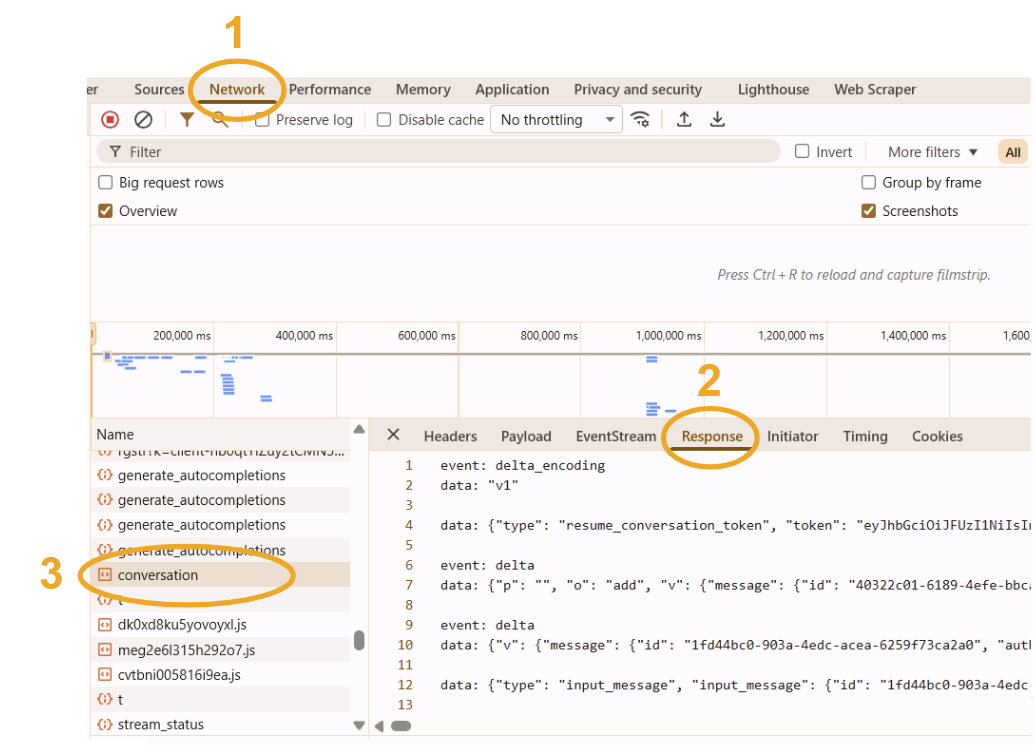
Press Ctrl+Shift+J (Windows/Linux) or Cmd+Option+J (Mac) to open the Console, then click on the Network tab.
Enable Shopping Mode
Make sure the Shopping feature is enabled in ChatGPT. You can trigger it by asking product-related questions like "What's the best air fryer?"
Launch the Search
No need to wait for the response to complete. Once the quiz questions appear on screen, you're ready to capture the data.
Find the Conversation Request
In the Network tab, look for a request named conversation (it will be an EventStream). Click on it.
Copy the Response
Go to the Response tab, select all content with Ctrl+A, then copy with Ctrl+C.