Reverse engineering · June 2026

Inside Pinterest's algorithm

When you open Pinterest, an invisible mechanism decides in a fraction of a second what appears on screen. Here is how it reads you, and how to take advantage of it.

0
recommendation signals
0
data points attached to every pin
9
headline reco families
Powered by RESONEO

Every pin on your home feed arrives with a reason attached: the name of the signal that selected it for you. These names exist for real, identical on the app and on the website. By reading them, we reconstruct the way Pinterest understands you. Three acts: what it knows about you, how the machine works, and how to take back control.

Contents

Act 1

You've been figured out

Before explaining the machine, let's look at what it already knows about you. It's more precise than you think, and it's written in plain text.

1

The invisible label

Every pin on your home feed carries a secret label that says why it is there.

📌
REPIN_BOARD

This word is not decorative. It's the signal that triggered this pin's display. There are 263 of them, one for each way of guessing what might catch your eye.

✔ Verified on the app and on the website: this is not a theory
2

Your advertising profile

Pinterest doesn't just guess your profile: it writes it out, in black and white, in the page your browser receives.

Advertiser sheet test account

Inferred age range45-49
Gendermale
Inferred regionFR-IDF
Targeted interestssportsavoury buffetsLuxury bagMen Gift Box
Retargeting activeon
Off-Pinterest perso.on

Age range, gender, region, interests bought by advertisers, and even the fact that an advertiser you've already visited « follows » you: it all travels in plain text. Want to see yours? The Mirror module decodes it for you.

Pinterest sees your image

Before it even classifies it, the algorithm « reads » your visual with several AI models. Here is what it extracts, measured on our captures.

🅰️ Auto alt text

Pinterest writes its own description of your image (« a white plate with a slice of bread… »). Present on 77 of 80 pins.

auto_alt_text

🔡 Text reading (OCR)

The text written INSIDE the image is read and indexed, just like the title. Your keyword should appear there.

OCR

🎯 Detected objects

Detection boxes locate the objects in the visual (x, y, width, height zones).

visual_objects

🎨 Dominant colour

The main hue is extracted from every pin. Present on 80 of 80 pins.

dominant_color

🧠 AI topics

A model ties the pin to an interest (« food and drinks »), without relying on your tags.

gen_ai_topics

🔑 Visual fingerprint

A unique perceptual signature. It's the « seed » used to suggest neighbouring pins to you.

image_signature

Direct takeaway for your pins : a sharp visual, a keyword written in the image, a filled-in alt text. Pinterest doesn't just store your image, it understands it.

Act 2

Here is the machine

Millions of pins go in one end, twenty-five come out the other. In between: a three-stage pipeline and a gallery of specialised signals.

3

The three-stage funnel

Select, score, assemble. The final score, though, never leaves Pinterest's servers.

1. Candidate selection

Millions of pins narrowed down to a few thousand. This is where the 263 signals act.

🔒

2. Ranking

A model scores every pin. That score decides the order, and stays on the server, never shown.

3. Assembly

Blending, diversity, and ads. On the web, about 4 of the first 10 pins shown are sponsored, often right at the top of the page.

Real composition of a top 10 (desktop web) : 4 sponsored pins, at positions 1, 3, 4 and 9.

1
2
3
4
5
6
7
8
9
10
Sponsored Organic
4

The signal gallery

The 263 signals split into 9 headline reco families, plus 7 cross-cutting or technical families (freshness, shopping, formats, ads, onboarding, system). Here are the 9 main engines first; all 16 families are explorable below.

Engagement memory

Re-shows what already worked on you, or on people like you.

NAVBOOST_PFYRECBOOST_*REPIN_BOARDCLICKTHROUGH

The social graph

« People who saved this also liked… »

GRAPHSAGE_*PIXIE_*P2P_*

Your interest profile

A model of you, broken down into several interests.

PINNERSAGE_*USER_SEQUENCE_INTERESTS_PINS

Content understanding

Reads the pin's image and text to find its neighbours.

PINNABILITY_CONDITIONAL_PIN_EMBEDDINGSPLPUIC

Generative AI

Guesses your intentions and builds recommendations for you. It also drives your notifications (the NOTIF_* families).

RECGPT_CG_USER_TO_PINSNOTIF_RECGPT_INTEREST_CG

Your searches

What you type into search also feeds your home feed.

SEARCHSAGE_PFY*_SEARCH_QUERIES
🕵️ Never published

Steering

Quotas for freshness, creators, categories. The editor's invisible hand.

INTENTIONAL_DISTRIBUTION_*SIFTER_*

Content fingerprint

A digital signature of each pin's text and video.

GEMINI_V5_EMBEDDINGSTEXT_EMBEDDINGSVIDEO_EMBEDDINGS

Your life off Pinterest

Brands visited, browsing elsewhere: it all flows back here.

PINNERSPARK_INTERESTUSER_OFFSITE_*OFFSITE_INTEREST

« Gemini V5 » is an internal Pinterest model, unrelated to Google Gemini.

The 263 signals, in plain text

The full list, exactly as it appears in the code: 9 reco families, 7 cross-cutting families, 263 signals in total. Filter by family. Format: code  SIGNAL_NAME.

Popular hits, or finds tailored to you?

Depending on the signal that selects you, the content doesn't carry the same popularity. We measure it by the number of saves.

The head
0.9k to 6.6k
median saves. Broad themes, generative AI, content similarity. Heavily-saved « hits ».
RECOMMENDED_TOPICS · RECGPT · MULTI_EMBEDDINGS
The long tail
60 to 150
median saves. Personalised from a pin you just saw. Niche finds.
PINNABILITY_CONDITIONAL_PIN_EMBEDDINGS
For the curious: the academic lineage of these signals

The families above map to a decade of Pinterest publications:

Sifter and Intentional Distribution, on the other hand, have no public paper: that's the real blind spot.

The most concrete proof: the seed pin

For the PINNABILITY_CONDITIONAL_PIN_EMBEDDINGS sources, a pin's "reason" points to a seed pin: a pin you saw or engaged with recently. Decoding the tracking of a real save, we read f6=232 (the source) and f8=2203789a2be7b55b2fa6008c8aedfbcf. That hash is not the displayed pin's image: it's the image_signature (visual fingerprint) of another pin, the seed. In other words, the candidate cluster is addressed by the visual content of a recent pin. "Because you saved something similar" is literal.

5

The closed loop

Your action doesn't vanish into the void. It comes back to reinforce the signal that showed you the pin.

💾

You save a pin

🏷️

The app tells Pinterest which signal had selected it

📈

That signal is reinforced, for you, within seconds

A save is worth more than a like. Time spent counts as much as the click. And engagement that lasts months weighs more than a one-day spike.

👁️

Impression
seen, and logged

⏱️

Outbound click ≥ 5s
the "good click", Pinterest's take on NavBoost's longest good click

🔥

Click ≥ 120s
strong engagement, memorised

The exact thresholds we measured

Pinterest counts a qualified outbound click from 5 seconds (counter AUTOMAGICAL_BOARD_PIN_5S_OUTBOUND_CLICKS): the direct equivalent of NavBoost's "longest good click". A second threshold, at 120 seconds of outbound click, triggers the local memorisation of an interest. Dwell time is measured continuously through TIMED_PAIR event pairs: in our live captures, from 0.35s to 181.8s on a single pin.

6

The hidden part

We see which signal selected the pin. We never see the score that decides the order.

☀️ What we observe

  • ✔ The reason for each pin (the signal)
  • ✔ Your inferred advertising profile
  • ✔ Engagement aggregates (saves)
  • ✔ Pins already seen, declared to the server as you scroll
  • ✔ Near-duplicate signatures (near_dup_sig) sent back so the server stops re-showing look-alike pins

🌑 What stays in the dark

  • ✖ The quality score (pinnability_multi_scores)
  • ✖ The flag « re-ranked » (is_post_reranked)
  • ✖ The quality / trust / shopping badges
  • ✖ The re-ordering, never redone in the browser
How we know the score stays on the server

Feed pagination does not use a plain page number. The cursor (the "bookmark") encodes a score boundary: an INT64_MAX − N value where N derives from the ranking score. To serve the next page, the server resumes "below" that boundary. That's the signature of an ordering driven by a continuous server-side score: if the client ordered the feed itself, it wouldn't need this score cursor.

The NavBoost wink

NavBoost is the exact name of a Google system, made famous by the 2023-2024 antitrust trial. Yet Pinterest uses the same word in its own code, and had even published it as early as 2018: a signal that measures clicks, long clicks and saves, segmented by country, gender and time window (7 days, 90 days, 2 years). Coincidence? Or a Google defector who moved to Pinterest with the concept in their luggage?

The wink repeats: Pinterest also has an in-house component called Gemini (GEMINI_V5_*), which has nothing to do with Google's Gemini. Borrowing the names that make headlines is an internal habit. Seven years on, NAVBOOST_* signals still surface your pins.
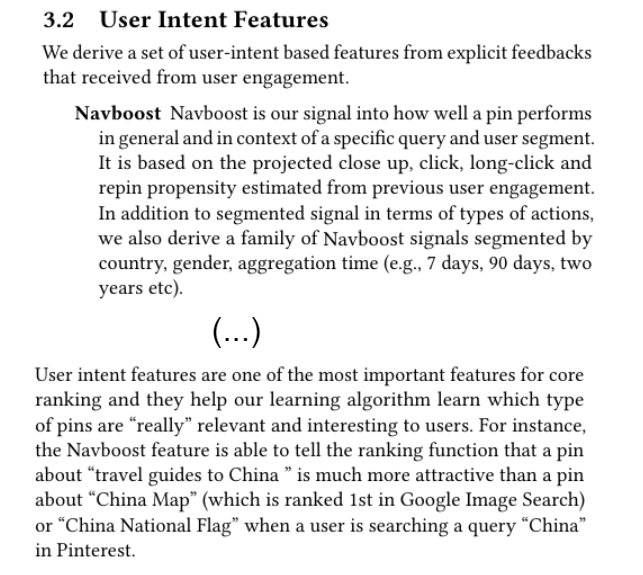
Excerpt from the Pinterest paper describing NavBoost (2018) Source: Pinterest, « Demystifying Core Ranking in Pinterest Image Search », arXiv:1803.09799 (2018)

Act 3

Take back control

Understanding the machine is good. Making it work for you is better. On to the tests and the concrete levers.

7

We tested it for real

The algorithm reacts almost in real time, and it forgets just as fast.

Test A: I save

Five « bonsai » pins saved, and the home feed switches to plants within seconds.

Before: decor, travelAfter: botany
Test B: I search

A single « Japanese bonsai » search and botanical content slips into the home feed, with no visible « search » label.

via generative AI
Test C: I decline

One click on « see less » and the source disappears. Reversible: the algorithm forgets as fast as it learns.

negative signal

What our tests showed, Pinterest now confirms publicly: since 2026, recommendations update while you browse, instead of waiting for a retraining.

8

Your SEO / GEO levers

Two sources: our analysis and the 2026 public watch.

Our analysis

From cold, content does the talking

Without history, the content-understanding signals are what surface you. Your only lever: a distinctive visual, a clear title and description.

Our analysis

Trigger an early save

This is the number-one real-time lever. A quick save triggers redistribution within seconds.

Our analysis

The seed is visual

« Because you saved something similar » starts from the visual fingerprint of a pin seen recently. A consistent visual places you in the right clusters.

Our analysis

Avoid near-duplicates

The feed de-duplicates visually look-alike pins (the near_dup_sig signature). Posting ten near-identical variants cannibalises them: clearly distinct visuals work better.

2026 watch

Write inside the image

Pinterest reads the text inside the visual (OCR). Your main keyword should appear there, not just in the title.

2026 watch

Systematic alt text

Always fill in the alt text: Pinterest indexes it just like the title. Community analyses link it to a clear rise in impressions and outbound clicks.

2026 watch

The first-save board

The board where you first save a fresh pin shapes the understanding of your content. Name it precisely.

Our analysis

Entity consistency

Consistently covering a topic strengthens where you're filed in the right interest: this is what the PinnerSage and topic signals drive (RECOMMENDED_TOPICS, FOLLOWED_INTEREST, the top_interest field attached to each pin). Alignment matters more than volume.

2026 watch

Think GEO, not just SEO

Pinterest Assistant answers multimodal conversational queries. Structure your content as an answer to an intent, situational and seasonal.

Our analysis

The feed is replayed on every visit

A missed impression is never final. Freshness is a lever: publish regularly rather than in bursts.

9

The mirror: decode your own page

Paste the source code of your Pinterest home feed. The tool hands you back what Pinterest knows about you, and why each pin is there.

🔒 100 % in your browser. No data is sent, nothing is stored.
1. On pinterest.com (logged in), press Ctrl+U (view source).
2.Important: stay on the view-source:… tab, wait 5 seconds, then do a hard refresh (Shift+F5). This forces Pinterest to load the real page instead of the loading screen.
3. Ctrl+A then Ctrl+C to copy everything.
4. Paste below and click Reveal me.
⚠️ Do not share the result: it may contain your email and session tokens.

🪪 Your advertising profile

🧲 Why these pins?

🫥 Your exposed footprint

🌑 What Pinterest doesn't show you

The score that decides your feed's order (pinnability_multi_scores) is absent from the page. A number governs your home feed, and it appears nowhere here.
